8:56 AM
 ItRocks

How to Hide Data in Image, Audio & Video Files:

Ever wondered to know how to hide secret messages in images, audio and video files? Well, in this post I will take you through a concept called steganography using which, it is possible to hide your secret information in image files, songs or any other file of your choice. At the end of this post, you can also download free stegnographic tools and start hiding your data.
What is Steganography?
--->
Steganography is a means of obscuring data where secret messages are hidden inside computer files such as images, sound files, videos and even executable files so that, no one except the sender and the receiver will suspect the existence of stealth information in it. Steganography may also involve the usage of cryptography where the message is first encrypted before it is concealed in another file. Generally, the messages appear to be something else such as an image, sound or video so that the transfer of secret data remains unsuspected.
The main advantage of steganography over other methods such as cryptography is that, it will not arose suspicion even if the files fall in the hands of a third party. Unlike cryptographic messages, stegnographic messages will no way attract the attention of a third party by themselves. Thus stegnanography has an upper hand over cryptography as it involves both encryption and obscurity.
What are the Applications of Steganography?
Steganography is mainly used to obscure confidential information/data during storage or transmission. For example, one can hide a secret message in an audio file and send this to another party via email instead of sending the message in the textual format. The receiver on the other end will decrypt the hidden message using the private decryption key. In a worst case scenario, even if a third party does manage to gain access to the email, all he can find is the audio file and not the hidden data inside it. Other usage of steganography include digital watermarking of images for reasons such as copyright protection.
Eventhough steganography has many useful applications, some may use this technique for illegitimate purposes such as hiding a pornographic content in other large files. Roumors about terrorists using steganography for hiding and communicating their secret information and instructions are also reported. An article claiming that, al-Queda had used steganography to encode messages in images and transported them via e-mails, was reported by New York Times, in October 2001.
How do Steganography Tools Work?
Stegnography tools implement intelligent algorithms to carefully embed the encrypted text messages or data inside other larger files such as an image, audio, video or an executable file. Some tools will embed the encrypted data at the end of another file so that there will be enough room for storing larger data.
There are many steganography tools available online but only a few are able to work flawlessly. I did not find any tool that worked perfectly on both small and large data. However I have managed to develop my own tool that can work perfectly on all types of files and all size of data. The tool is called “Stego Magic“. You can download it from the following link.
Download StegoMagic.zip
The zip file contains two versions of Stego Magic: One for encrypting the text messages and the other for encrypting binary files. StegoMagic_TXT can be used to hide text messages in other files such as an image or a sound file. StegoMagic_BIN can be used to hide one binary file in another such as an executable file inside an image or an image inside a video file.
With Stego Magic, there is no limitation on the size and type of the file that you are intending to hide. For example, you can hide a video of size 1 GB in an image of size 1 MB or hide an executable file inside a WORD document. The tool is pretty straightforward to use and requires no special understanding of the concept.
At the end of the encryption process, a secret decryption key will be generated and the same is required during the decryption process.
How to Use Stego Magic?
Suppose you want to hide a text message inside a JPG file:
1. Place the JPG and the text file (.txt) in the same folder as that of StegoMagic_TXT.exe
2. Run StegoMagic_TXT.exe and follow the screen instructions to embed the text message inside the JPG image.
3. Note down the secret decryption key.
Now you can send this image to your friend via email. To decrypt the hidden message, your friend should load this JPG file onto the Stego Magic tool and use the secret decryption key.
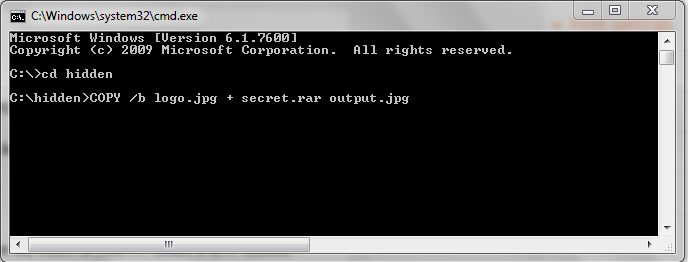
Hide files in pictures without software Click here
Enjoy....
Don't forget to like and comment...:)
Ever wondered to know how to hide secret messages in images, audio and video files? Well, in this post I will take you through a concept called steganography using which, it is possible to hide your secret information in image files, songs or any other file of your choice. At the end of this post, you can also download free stegnographic tools and start hiding your data.
What is Steganography?
--->
Steganography is a means of obscuring data where secret messages are hidden inside computer files such as images, sound files, videos and even executable files so that, no one except the sender and the receiver will suspect the existence of stealth information in it. Steganography may also involve the usage of cryptography where the message is first encrypted before it is concealed in another file. Generally, the messages appear to be something else such as an image, sound or video so that the transfer of secret data remains unsuspected.
The main advantage of steganography over other methods such as cryptography is that, it will not arose suspicion even if the files fall in the hands of a third party. Unlike cryptographic messages, stegnographic messages will no way attract the attention of a third party by themselves. Thus stegnanography has an upper hand over cryptography as it involves both encryption and obscurity.
What are the Applications of Steganography?
Steganography is mainly used to obscure confidential information/data during storage or transmission. For example, one can hide a secret message in an audio file and send this to another party via email instead of sending the message in the textual format. The receiver on the other end will decrypt the hidden message using the private decryption key. In a worst case scenario, even if a third party does manage to gain access to the email, all he can find is the audio file and not the hidden data inside it. Other usage of steganography include digital watermarking of images for reasons such as copyright protection.
Eventhough steganography has many useful applications, some may use this technique for illegitimate purposes such as hiding a pornographic content in other large files. Roumors about terrorists using steganography for hiding and communicating their secret information and instructions are also reported. An article claiming that, al-Queda had used steganography to encode messages in images and transported them via e-mails, was reported by New York Times, in October 2001.
How do Steganography Tools Work?
Stegnography tools implement intelligent algorithms to carefully embed the encrypted text messages or data inside other larger files such as an image, audio, video or an executable file. Some tools will embed the encrypted data at the end of another file so that there will be enough room for storing larger data.
There are many steganography tools available online but only a few are able to work flawlessly. I did not find any tool that worked perfectly on both small and large data. However I have managed to develop my own tool that can work perfectly on all types of files and all size of data. The tool is called “Stego Magic“. You can download it from the following link.
Download StegoMagic.zip
The zip file contains two versions of Stego Magic: One for encrypting the text messages and the other for encrypting binary files. StegoMagic_TXT can be used to hide text messages in other files such as an image or a sound file. StegoMagic_BIN can be used to hide one binary file in another such as an executable file inside an image or an image inside a video file.
With Stego Magic, there is no limitation on the size and type of the file that you are intending to hide. For example, you can hide a video of size 1 GB in an image of size 1 MB or hide an executable file inside a WORD document. The tool is pretty straightforward to use and requires no special understanding of the concept.
At the end of the encryption process, a secret decryption key will be generated and the same is required during the decryption process.
How to Use Stego Magic?
Suppose you want to hide a text message inside a JPG file:
1. Place the JPG and the text file (.txt) in the same folder as that of StegoMagic_TXT.exe
2. Run StegoMagic_TXT.exe and follow the screen instructions to embed the text message inside the JPG image.
3. Note down the secret decryption key.
Now you can send this image to your friend via email. To decrypt the hidden message, your friend should load this JPG file onto the Stego Magic tool and use the secret decryption key.
Hide files in pictures without software Click here
Enjoy....
Don't forget to like and comment...:)
 Posted in: